RangeRevert EA Explained: Mean Reversion With ATR + ADX Gates (MT5)
This guide is written for EA developers who will open the source on GitHub and want to understand it quickly. We’ll explain what RangeRevert is, how the MQ5 engine and MQH strategy module work together, what inputs you can tune, and how a real preset (.set) wires everything up.
1) What RangeRevert is
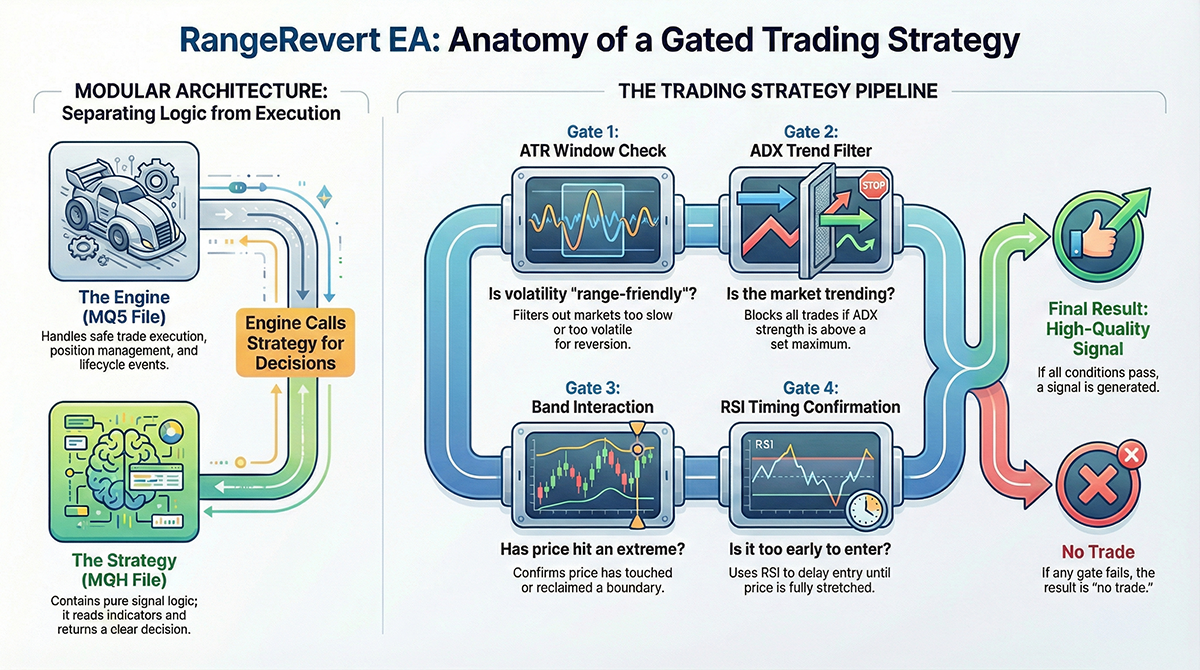
RangeRevert is a mean-reversion EA designed for markets that oscillate inside a range. It focuses on a single idea: when price stretches to the edge of a range, it often returns toward the middle.
The important part is what RangeRevert does before it trades:
- ATR window gate: only trade when volatility is within a “range-friendly” band
- ADX max gate: avoid trading when the market shows trend strength
- Band interaction: confirm price touched or reclaimed a boundary (Bollinger-style logic)
- Timing confirmation: RSI is used as a “don’t-enter-too-early” filter
If any gate fails, RangeRevert returns no trade. That’s why it can look “low frequency” in backtests, but the goal is to trade only the higher quality range regimes.
2) File layout: MQ5 vs MQH vs Inputs vs .set
RangeRevert is intentionally split into separate files so the code stays maintainable:
RangeRevertEA.mq5(Engine)- The MT5 event-driven “runner”. It handles lifecycle (OnInit/OnTick), session rules, indicator handles, position management, and placing orders. The engine is responsible for execution safety.
RangeRevert.mqh(Strategy module)- Pure signal logic. No order placement. It reads indicator values (ATR/ADX/RSI/bands) and returns a clean result: buy, sell, or block reason. This file is responsible for trade logic.
RangeRevert_Inputs.mqh(Input schema)- All inputs in one place, aligned for presets and consistent naming. This file is responsible for configuration consistency.
*.set(Preset)- A real deployment profile (pair, timeframe, session window, and tuned thresholds). This is what you optimize and ship.
3) How the engine runs (RangeRevertEA.mq5)
3.1 OnTick is not “trade every tick”
MT5 calls OnTick() on every incoming tick, but RangeRevert uses it as a coordinator: manage positions, apply gates, and run strategy evaluation on the proper cadence.
Snippet (engine entry point):
void OnTick()From here, the engine typically does three high-level things: (1) manage an existing position, (2) decide if it is allowed to look for new entries, (3) if allowed, evaluate strategy.
3.2 “Manage open position first” (avoid conflicting logic)
A common EA bug is evaluating entries while an existing position needs attention. RangeRevert handles open-position logic first and only evaluates new entries when no position exists for the EA’s magic number.
Snippet (position existence check):
if(PositionExists(_Symbol, (int)InpMagic))This is the foundation of “one EA, one position”. It prevents stacking signals and keeps live behavior stable.
3.3 Strategy evaluation is delegated to the MQH module
The engine constructs inputs and calls the strategy module with indicator handles and configuration. The strategy module returns both: a result code (block reason / ok) and a signal payload (direction / prices / metadata).
Snippet (core call into MQH):
const RangeRevertResult res = RangeRevert_EvaluateHandles( hAtr, hRsi, hBb, hAdx, _Symbol, InpTargetTf, shift, _Point, sin, ss );This is the most important architectural point: the engine does not “invent” signals. It asks the strategy module for a decision, then executes.
3.4 Result codes keep the EA debuggable
Instead of “just returning false”, the strategy module returns explicit reasons such as “blocked by ATR” or “blocked by ADX”. The engine can then count these in diagnostics. This is invaluable when you optimize and wonder why trade count is low.
Snippet (example result handling):
if(res == RANGEREVERT_BLOCK_ATR) return;When you see few trades, you can often identify whether ATR window, ADX max, or band logic is responsible.
4) Strategy logic (RangeRevert.mqh)
The strategy module is built as a gate pipeline. If any gate fails, it returns a block result immediately. This keeps the logic predictable and prevents “almost valid” entries.
4.1 ATR window gate (range-friendly volatility only)
ATR is converted to “points” (ATR / point), then compared to min/max thresholds. This avoids trading when the market is too dead (no snap-back) or too hot (breakout risk).
Snippet (minimum ATR gate):
if(inps.atr_min_points > 0.0 && atr_points < inps.atr_min_points) return RANGEREVERT_BLOCK_ATR;Snippet (maximum ATR gate):
if(inps.atr_max_points > 0.0 && atr_points > inps.atr_max_points) return RANGEREVERT_BLOCK_ATR;Practical tuning note: ATR min tends to control “do we trade at all”. ATR max is optional if your ADX filter already blocks trend expansions.
4.2 ADX max gate (range-only regime filter)
ADX is not used to enter trades. It is used to say: “the market is trending, mean-reversion is not reliable”.
Snippet (ADX block):
if(adx > inps.adx_max_to_trade) return RANGEREVERT_BLOCK_ADX;For EA trading, this gate is critical. Without it, a “range strategy” will eventually fade a real trend and take deep drawdowns.
4.3 Band interaction + reclaim behavior
RangeRevert supports two entry styles:
- Touch: enter when price touches the band boundary (faster, more trades, more false starts)
- Reclaim: require price to re-enter back inside the band after a break (slower, fewer trades, more reliable)
Snippet (reclaim switch is part of inputs):
sin.require_reclaim = InpRequireReclaim;If you want trade quality first, start with reclaim enabled and relax later only if trade count is too low.
4.4 RSI confirmation is timing, not prediction
RSI here is meant to stop the EA from entering too early. In ranges, timing matters: buying “slightly oversold” is not the same as buying “fully stretched”.
In practice, RSI thresholds often determine the shape of your equity curve more than you expect, because they control entry timing.
5) Inputs you can tune (RangeRevert_Inputs.mqh)
The inputs are grouped so you can optimize them safely. The most important thing to understand is units: many thresholds are in POINTS. That means:
- On a 5-digit FX symbol, 10 points = 1 pip
- On JPY pairs, 10 points is also typically 1 pip (depends on broker digits)
Snippet (ATR window inputs):
input int    InpAtrPeriod         = 14;
input double InpAtrMinPoints       = 1.8;
input double InpAtrMaxPoints        = 6.0;
The defaults are “safe placeholders”. Your actual .set may use very different numbers depending on timeframe and symbol. (Example below uses a higher ATR minimum in points for EURGBP M15.)
Snippet (ADX filter inputs):
input int    InpAdxPeriod         = 14;
input double InpMaxAdxToTrade     = 20.0;
The EA philosophy is simple: ADX above the max means no mean reversion trades. For many range EAs, values around 18–25 are common starting points, then tuned per pair and session.
Snippet (reclaim behavior input):
input bool InpRequireReclaim = false;If you switch this to true, expect fewer trades but better “range integrity”. If trade count becomes too low, you can loosen RSI thresholds or session window before disabling reclaim.
6) Example preset (.set): NewYork_RangeRevert_EURGBP_M15
A preset is where the strategy becomes real. This example shows how the RangeRevert inputs are tuned for: EURGBP, M15, during the New York session window.
Snippet (ADX max in the preset):
InpMaxAdxToTrade=20.0Snippet (ATR window in the preset):
InpAtrPeriod=14
InpAtrMinPoints=25.0
InpAtrMaxPoints=0
Notice the ATR min is 25.0 points here. On a 5-digit symbol, that’s roughly ~2.5 pips. This is a common pattern: on M15, you often need a higher min volatility so price actually “snaps back”.
Snippet (reclaim choice in the preset):
InpRequireReclaim=falseThis preset chooses the faster “touch” style (reclaim disabled). If you want more conservative entries, flip it to true and re-optimize RSI thresholds to restore trade frequency.
7) How to read the GitHub code without getting lost
- Start from RangeRevert.mqh and understand the gates: ATR window → ADX max → band interaction → RSI confirm → result.
- Then open RangeRevertEA.mq5 and look only for: where it calls the strategy module, and what it does with the result.
- Finally, open RangeRevert_Inputs.mqh and map each input to the corresponding gate.
- Use a real .set file to understand the “real deployed values”. Defaults are not the truth; presets are.
If you do those four steps, the code becomes easy to follow and you’ll know exactly what to tune when trade count or drawdown looks wrong.
Comments